
Download SigueFit – fitness app, workout tracker, schedule shifts, manage fitness routine, access control, QR code, shift history, card, payments, statistics, news updates
Overview
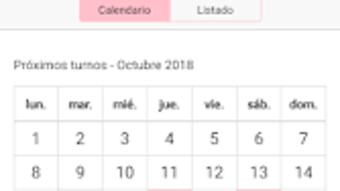
SigueFit is a dedicated fitness application designed specifically for registered users of the SigueFit management system. Built for Android, this free software serves as a centralized platform for managing personal fitness routines and related operational tasks. The app enables users to schedule, modify, or cancel shifts, view real-time availability, and review detailed shift histories.
It also provides access to personal fitness cards, payment records, and performance statistics, making it a comprehensive tool for tracking fitness engagement. Additionally, the app features a news section that delivers updates on promotions, facility announcements, and other relevant information. When Access Control is enabled by the fitness center, users can enter the establishment by presenting a QR code generated directly through the app.
This integration streamlines entry processes and enhances user convenience. The target audience includes fitness professionals, gym staff, and members who rely on structured scheduling and digital access. The developer, SigueFit Systems, appears to focus on creating integrated solutions for fitness management.
While specific technical details about the app’s architecture or backend are not provided, its functionality suggests a strong emphasis on operational efficiency and user accessibility.
Key Features & Capabilities
- Schedule and Manage Shifts: Users can adjust their scheduled shifts, cancel appointments, or reschedule based on availability. This feature supports real-time updates, allowing for quick modifications to personal work or training schedules.
- Shift History Access: A detailed record of past shifts is maintained, enabling users to review completed sessions, track attendance, and analyze performance over time.
- Personal Fitness Card: The app provides digital access to a personal fitness card, which may be used for authentication, access, or tracking membership status.
- Payment and Financial Tracking: Users can view the latest payments, invoices, or transaction records, helping them stay informed about their financial obligations or reimbursements.
- Performance Statistics: The app includes tools for monitoring fitness progress, offering insights into workout frequency, duration, and other relevant metrics.
- News and Updates Section: A built-in news feed delivers timely information on promotions, facility events, and system updates, ensuring users remain informed.
- QR Code Access Control: When enabled by the fitness center, users can generate a QR code within the app to gain automatic entry to the facility, simplifying the check-in process.
These features collectively support a seamless experience for users who require both personal fitness tracking and operational management tools. The integration of access control via QR code adds a layer of convenience for daily use, particularly in environments where physical entry is tied to digital authentication.
User Interface, Workflow & Performance
The user interface of SigueFit is described as friendly and intuitive, designed to facilitate easy navigation across its core functions. The layout appears optimized for mobile devices, with clear menu structures and accessible icons that guide users through shift management, payment history, and statistics. Navigation is likely streamlined to minimize steps between tasks, supporting efficient workflow execution.
While specific details on performance metrics such as CPU usage, memory consumption, or load times are not provided, the app’s lightweight size of 20.5 MB suggests it is designed for efficient operation on standard Android devices. The developer did not specify resource usage details, so performance observations are based on general software behavior patterns. Stability is implied by the app’s structured feature set and focus on core functionalities.
No reports of crashes or bugs were mentioned in the provided information. Overall, the workflow appears designed to reduce friction, allowing users to manage their fitness routines and operational tasks with minimal effort.
Compatibility & System Requirements
SigueFit is designed to run on Android operating systems. The app’s version is listed as 1.0.0, indicating it is in an initial release phase. The installation size is 20.5 MB, which is relatively compact for a feature-rich application.
The developer did not provide additional system requirements, such as minimum Android version, RAM, or processor specifications. As such, compatibility information is limited to the platform stated. Users are advised to ensure their device meets the minimum Android requirements for app installation.
Exact system requirements were not listed. It is recommended to verify compatibility with the device’s operating system version before downloading. The app’s lightweight footprint suggests broad compatibility with most modern Android devices, though this remains unconfirmed by official specifications.
Pros and Cons
Pros
- Free to download and use, making it accessible for a wide range of users.
- Intuitive interface designed for ease of navigation and quick access to key features.
- Integrated QR code access control streamlines entry to fitness facilities.
- Comprehensive shift and payment management for registered users.
- Real-time access to shift history, fitness statistics, and personal card details.
- Regular news updates keep users informed about promotions and facility changes.
Cons
- Platform availability is limited to Android; no support for iOS or other operating systems was mentioned.
- Specific system requirements were not disclosed, which may affect installation on older devices.
- Functionality is restricted to registered users of the SigueFit management system.
- Performance and resource usage details were not provided by the developer.
- App is currently in version 1.0.0, suggesting it may still be in early development with potential for future updates.
FAQ Section
Is SigueFit available for iOS devices?
Based on the provided information, SigueFit is currently designed for Android only. There is no indication of iOS compatibility at this time.
Is the app secure for handling personal and payment data?
The app is intended for registered users of the SigueFit management system. While specific security protocols were not detailed, the use of QR code access and digital payment tracking suggests a focus on data integrity. Users should ensure they are accessing the app through official channels.
How often does the app receive updates?
The app’s version is listed as 1.0.0, indicating an initial release. The frequency of updates has not been specified by the developer.
Can I use SigueFit without being registered in the SigueFit system?
No. Access to the app’s full functionality is restricted to registered users of the SigueFit management system. The app does not support standalone or guest access.
Does the app work offline?
Information about offline functionality was not provided. The app may require an active internet connection for features such as shift updates, QR code generation, and news delivery.
Final Thoughts + CTA
SigueFit stands out as a practical and focused tool for individuals integrated into the SigueFit management ecosystem. Its ability to combine fitness routine management with operational tasks like shift scheduling, payment tracking, and digital access via QR code offers a unique value proposition. The app’s clean interface and free availability enhance its appeal, particularly for fitness professionals and members who prioritize efficiency and organization.
While platform limitations and the lack of detailed system requirements may restrict broader adoption, the app fulfills its intended purpose for registered users. With a solid foundation and a clear focus on usability, SigueFit shows promise for future expansion. For those already part of the SigueFit system, this app is a necessary component of daily operations.
Download SigueFit now.







